

Exact actuator CAD files.
Choose the model, match the file to your engineering task, then verify configuration before design release.
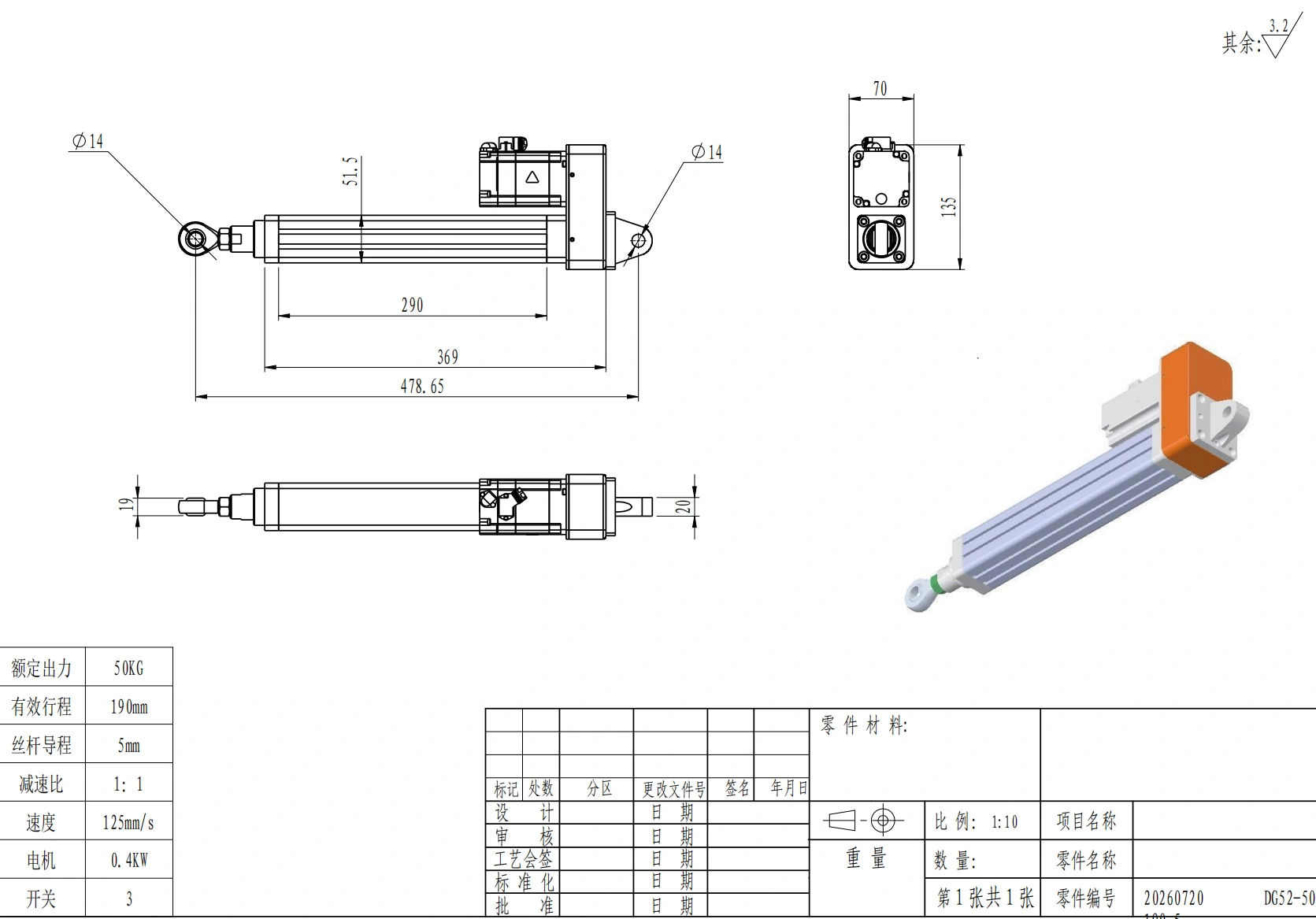
One model at a time, with the evidence boundary visible.
Five DG PDF filenames are confirmed by the project source. A filename does not by itself prove that the file is a released drawing, 3D CAD model or controlled project record.
| Model | Confirmed file | Type | Access / verification note |
|---|---|---|---|
| DG52 | DG52.pdf | PDF product file | Request the current published file if no verified download link is shown. |
| DG75 | DG75.pdf | PDF product file | Request the current published file if no verified download link is shown. |
| DG95 | DG95.pdf | PDF product file | Request the current published file if no verified download link is shown. |
| DG134 | DG134.pdf | PDF product file | Request the current published file if no verified download link is shown. |
| DG220 | DG220.pdf | PDF product file | Request the current published file if no verified download link is shown. |
Match the engineering record to the decision you are making.
The same actuator can need different records at different project stages. Select a purpose to focus the page, but do not assume a file format that has not been verified for the model.
3D CAD model
Use for assembly layout, envelope checks and interference review.
2D dimensional drawing
Use when interfaces, mounting dimensions and explicit dimensions control the design.
Datasheet / product PDF
Use for performance, operating condition and configuration review.
Turn the release checks into a sequence you can actually work through.
Mark each item as you review it. This checklist is a workflow aid, not a claim that the project record is controlled or approved.
Revision review, effectivity, approval evidence and order-specific document lists belong in the Technical Documentation path.
Supplier-backed is stronger than anonymous third-party geometry, but it still needs verification.
Public CAD libraries can help preliminary layout. For design release, prefer a current file tied to the intended ServoCylMotion model and check critical interfaces against current supplier information.
Ask for the exact record instead of inferring from another model.
Send family / model, stroke, mounting or fixture requirements, motor / feedback / connector options, required file type, preferred CAD format and project stage. If the model is not yet selected, include the motion and application requirements.
File access only helps when the file matches the real configuration.
This page is a model-level engineering-file library, not a substitute for controlled project documentation.
Where can I find linear actuator CAD downloads by model?
Start with the model index on this page. If a current CAD link is not shown, request the exact model, stroke, options and required format.
Which CAD formats are available?
Format availability has not been verified across all models. Request the exact model and preferred format rather than assuming STEP, DWG, DXF or a native CAD format.
Is a datasheet the same as a CAD drawing?
No. A datasheet summarizes product data; a CAD model or dimensional drawing is used when the design depends on exact geometry and interfaces.
Can I use one electric-cylinder drawing for another stroke or option?
Do not assume so. Stroke, mounting, feedback, motor and other configuration choices can change dimensions or interfaces.
Can I use a third-party CAD model for design release?
Use it cautiously for preliminary layout only. Check critical dimensions and interfaces against current supplier information before release.